

Writing an out-of-office message: templates and key details for every occasion

An out-of-office message is an automatic email reply that tells senders about your absence, the period involved, and who to contact instead. Three details are enough for a good out-of-office message: the period, the return date, and a reachable contact.
Out-of-office message – the essentials at a glance
- An out-of-office message should include at least the period of absence, the return date, and a reachable cover contact with name and email address.
- Illness-related absences should be worded without a diagnosis and without a prediction of the return date, because health data is specially protected under Article 9 GDPR.
- The tone of an out-of-office message depends on the audience. External contacts get a brief, factual message, while internal colleagues also get details about the cover arrangement.
- absentify automatically sets the out-of-office message in Outlook as soon as a planned absence begins, and removes it again on the return date. The app is ISO 27001 certified and processes data in the EU.

What absolutely must be in every out-of-office message?
Every out-of-office message needs only a few basic details: the period of absence with a start and end date, the return date, a named cover contact with a contact address where relevant, and a note on whether incoming emails are forwarded. If any of these details is missing, you get exactly the follow-up questions an automatic reply is meant to prevent.
A good out-of-office text stays under 80 words. Nobody reads everything above that in full, and every extra line increases the chance that a piece of information in it goes unread or becomes outdated.
How do I keep an out-of-office message GDPR-compliant?
Three types of content don't belong in an out-of-office message for privacy reasons: health data, private contact details, and detailed travel information.
Health data counts as a special category of personal data under Article 9 GDPR. A phrase like "I'll be back after my surgery on the 12th" reveals medical information about you to any sender at all. The neutral version is "I am currently out of the office".
Private mobile numbers and home addresses reach every sender through an automatic reply, including unknown ones. Use only your cover contact's work details.
The same principle applies to travel details. An out-of-office message that combines the exact travel dates with a note about an empty home is publicly available information about your absence from home. State the period, and leave out the destination and any accompanying details.
For sick notes, there's also the question of who actually sets the message. If an employee is off at short notice, they probably have no access to their mailbox. In that case, IT or an admin sets a neutral message without stating the reason.
The difference between an internal and an external out-of-office message
Outlook and most other mail programs allow two separate messages: one for senders inside your own organisation and one for all external senders. The two differ in level of detail.
The internal message can be specific. It names the cover contact, sometimes the affected projects, and a note on which topics will wait until your return. Colleagues need this information to plan their own work.
The external message stays brief: the period, the return date, a general shared address such as info@ or support@. Customers and suppliers don't need to know your internal task distribution or the names of individual team members.
If you maintain both versions, you need a clear cover arrangement in the team. Without a defined responsibility, the message names someone who doesn't even know about their cover role.
How do I word an out-of-office message for vacation, illness and parental leave?
The three most common occasions for setting an out-of-office message differ mainly in how far ahead they can be planned and how much detail they include. A vacation message states a fixed return date, an illness message leaves the return date open, and a parental leave message points to long-term cover instead of a date.
Out-of-office message for vacation
The out-of-office message for vacation is the standard case. It may sound friendly, but stays factual because it also reaches first-time contacts with customers.
The return date must be the first working day, not the last day of vacation. And the note on forwarding must be accurate, otherwise senders assume someone is reading their message.
For longer absences of three weeks or more, add a sentence about the order in which things will be handled after your return. That takes pressure off the first week back.
Out-of-office message for illness
An out-of-office message for illness names neither the illness nor a guess about how long it will last. Both are health data that needs protecting, and both can change.
Leaving out a return date is an advantage here. If the sick leave is extended, nobody needs to update the message.
If the employee no longer has access to their own mailbox, an admin sets the message via mailbox management. Agree in advance within the team who takes on this task, so no discussion arises during an illness.
Out-of-office message for parental leave
For an out-of-office message during parental leave, the cover contact takes centre stage. A return date is often months away and loses its usefulness for the sender.
For long absences, also check whether the mailbox should be covered by a forwarding rule. After twelve months of parental leave, deadline-bound matters and customer enquiries otherwise pile up in a mailbox nobody opens.
Which out-of-office message suits holidays, business trips and resignation?
Public holidays, business trips, and an out-of-office message during a period of resignation each need a different tone. The holiday message can sound personal, the business trip message emphasises reachability, and the resignation message stays strictly factual because it refers to an ended employment relationship.
| Occasion | Tone | Key details |
|---|---|---|
| Vacation | Friendly, factual | Period, return date, cover |
| Illness | Neutral, no reason given | Cover, shared address |
| Parental leave | Factual | Cover, forwarding note |
| Christmas and public holidays | Personal tone allowed | Closure period, first working day |
| Business trip | Factual | Period, response time, emergency contact |
| Resignation | Strictly factual | Departure date, successor or department |
Out-of-office message for Christmas and public holidays
An out-of-office message for Christmas differs from every other occasion because it usually applies to an entire company. During company-wide closure, every employee has the same period, which makes a single shared text worthwhile.
A personal closing line is appropriate here. Just make sure it fits your customer relationship. For public-sector or heavily regulated contacts, the neutral standard text remains the better choice.
Out-of-office message for a business trip
During a business trip you are reachable, but respond with a delay. This distinction belongs in the text because it sets the sender's expectations.
State a concrete response time: "once a day" or "within 48 hours" answers the question the sender is asking anyway.
Out-of-office message after a resignation
After someone leaves the company, the message is not really an out-of-office reply in the usual sense — it bridges the time until the mailbox is deactivated. The text stays factual and avoids any judgement of the employment relationship.
Two points are relevant under employment law. The departing employee's new professional address does not belong in the message without their consent. And how long the personalised mailbox stays active depends on whether private use was permitted and which internal rules apply. Data protection authorities sometimes recommend deactivating such accounts promptly. Agree wording and duration with HR, compliance and IT in advance.
How do I write an out-of-office message in German?
An out-of-office message in German follows the same structure as the English version, but uses set phrases. "Abwesend" for the state, "Ich bin ab dem … wieder erreichbar" for the return date, and "wenden Sie sich bitte an" for the cover contact.
For international teams or international customer contact, a bilingual message is worthwhile. Put the English text on top and the German text underneath, separated by a blank line. Senders can then see within a second which section applies to them.

Consistent out-of-office messages for your whole team
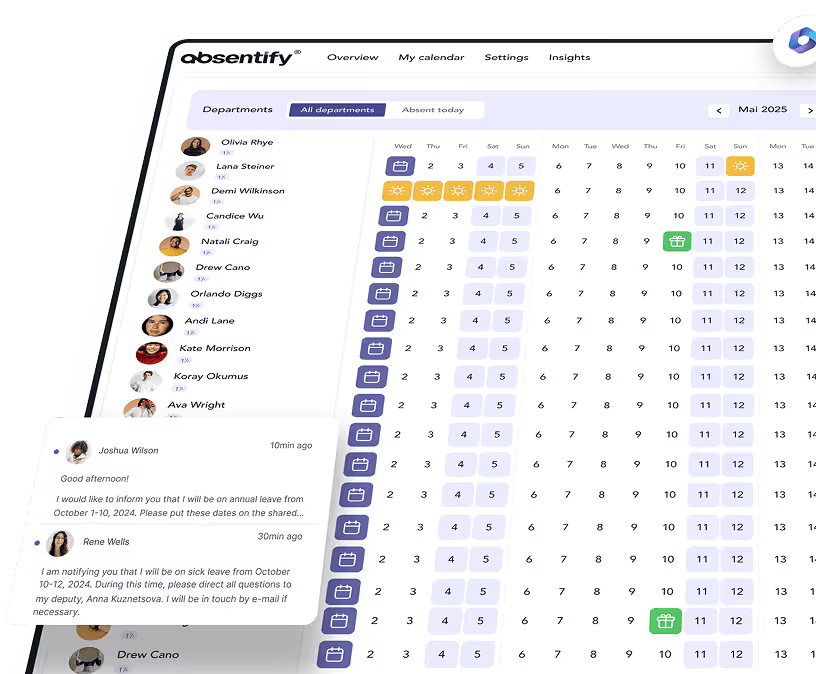
With absentify, every employee uses the same stored message without having to write it themselves.
How do I set up the out-of-office message in Outlook, Gmail and Teams?
In all three applications the feature sits in the account settings, but goes by a different name. Outlook calls it "Automatic replies", Gmail calls it "Vacation responder" under the general settings, and Microsoft Teams lists it as "Schedule out of office" under the status message.
Out-of-office message in Outlook
In Outlook, you find the automatic reply on the desktop under File and Info, and in the new Outlook under Settings and Accounts. There you set the start and end times and write separate texts for internal and external senders.
You can find the exact steps for Windows, Mac, browser and the mobile app in detail under out-of-office message in Outlook. If you're looking for ready-made text blocks for different occasions, the collection of out-of-office message templates will help.
Out-of-office message in Gmail and Microsoft Teams
In Gmail you turn on the feature via the gear icon, then "See all settings" and the "Vacation responder" section at the bottom of the page. By default, Gmail replies to the same sender only once every four days.
Microsoft Teams has its own out-of-office feature. You find it via your profile picture under Set status message and Schedule out of office. There you enter your own message text and the period.
Teams and Outlook keep these details in sync. An out-of-office period set in Teams shows up as an automatic reply in Outlook, and a change in Outlook conversely affects Teams. So you only maintain the text in one of the two places, but need to decide which one that is.
If your team plans several absences at the same time, it's worth looking at shared vacation planning. It prevents the cover contact named in the message from being on vacation themselves.
Can I automate setting the out-of-office message?
Yes, turning the out-of-office message on and off can be linked to a planned absence. Instead of switching the message on and off by hand, you enter your absence once, and the text appears automatically in Outlook at the start time.
That solves the two most common sources of error at once: forgetting to activate it on the day you leave, and forgetting to deactivate it after you return.
You can also use placeholders. The return date and cover contact's name are pulled from the recorded absence instead of being retyped in every text. If the vacation changes by two days, the message adjusts along with it.
For teams that want a consistent look, there's another benefit. If templates are stored in one place, every employee writes the same text in the same structure without having to word it themselves.
Automate your out-of-office message
Even a perfectly worded out-of-office message is useless if you forget to turn it on. Turning your out-of-office messages on and off, however, can be automated, so your calendar planning drives and controls the message at the same time. With absentify, this becomes possible for your whole team.
Your benefits with absentify:
- You enter your absence once, and the message appears automatically in your Outlook mailbox at the start time.
- You save yourself the follow-up work when things change, because the return date and cover contact are pulled from the planned absence.
- You store separate texts for internal and external contacts, controlling who learns which details.
- You work in an ISO 27001 certified app whose data is processed in the EU.
An out-of-office message you don't have to think about
The out-of-office message switches itself on when your vacation starts and off again after you return. With absentify.
Want to automate your out-of-office message?
- No credit card required
- Unlimited free access
- Upgrade or cancel anytime
Out-of-office message – frequently asked questions
About the author

Anna Keller
Content manager at absentify
As a blog author at absentify, Anna Keller explains how companies can efficiently manage absences, vacations, and working hours. In her articles, she combines HR practice with Microsoft 365 tips for Outlook and Teams and provides templates, step-by-step instructions, and software comparisons for modern, digital processes.
Share article
More interesting articles

Workplace leave policies: what employers need to consider
A leave policy sets out how employees request time off and how the company approves it. Some provisions may form part of the employment contract; collective agreements, works agreements and internal procedures can add further requirements. This article explains the German framework, where the Federal Leave Act (Bundesurlaubsgesetz, or BUrlG) provides the legal baseline. Together, these rules create a consistent process for workplace leave planning.
Anna Keller
Content manager at absentify
How to request annual leave: process, approval and rules
A leave request records the dates an employee would like to take off. It provides the basis for approval and team absence planning. Employers can check the dates against existing absences and operational requirements. Approval gives employees clarity about their holiday. This guide covers annual leave in Great Britain: the Working Time Regulations 1998, relevant agreements and the company's procedures determine the rules.
Anna Keller
Content manager at absentify
Remaining leave: calculation, carryover and German legal rules
How many days of leave are still available, and how long can they be used? A remaining leave balance answers precisely these questions. It shows which days from the current or an earlier leave year are still outstanding. For companies, this figure also matters for future leave planning. In Germany, whether unused days can be carried over or expire later depends primarily on section 7 of the Federal Leave Act (BUrlG) and the employer's duties to cooperate.
Anna Keller
Content manager at absentify