

How to request annual leave: process, approval and rules
A leave request records the dates an employee would like to take off. It provides the basis for approval and team absence planning. Employers can check the dates against existing absences and operational requirements. Approval gives employees clarity about their holiday. This guide covers annual leave in Great Britain: the Working Time Regulations 1998, relevant agreements and the company's procedures determine the rules.
Leave requests: the key points
- A leave request records the proposed holiday dates and provides the basis for approval, staffing plans and the subsequent absence record.
- Statutory notice rules apply unless a relevant agreement changes them. Employees should follow the company's request procedure and check the applicable notice period.
- Employers can refuse particular dates for business reasons, but must enable workers to take their statutory holiday entitlement.
- With absentify, leave requests, approval workflows, leave allowances and planned absences can be managed directly in Microsoft Teams and Outlook.

What does a leave request establish within a company?
A leave request connects an employee's personal holiday plans with the company's staffing needs. It records the dates being requested. Managers can compare the request with absences already planned. HR receives a documented record for managing the leave allowance. This turns a holiday preference into a process everyone can follow.
What information belongs in a leave request?
A leave request should at least identify the employee and the proposed dates. The company's procedure may ask for further details where these are needed to process it. Typical information includes:
- Employee's name
- First and last day of the proposed holiday
- Number of working days affected
- Department or team
- Date the request was submitted
- A colleague providing cover, if the company's process requires this
Employees do not normally need to justify ordinary annual leave. Private travel details should not be collected if they serve no purpose in processing the request.
Which leave request rules are statutory, and what can the employer decide?
The Working Time Regulations 1998 set the framework for taking statutory annual leave. A relevant agreement can change the notice requirements. Employers should explain the request channel, decision-making responsibilities and applicable rules in their holiday policy.
| Area | Legal framework | Company procedure |
|---|---|---|
| Request format | No universal statutory application form | A form, software or a defined internal process |
| Holiday dates | Statutory leave must be available, although particular dates may be refused | Approval responsibilities and checks against staffing needs |
| Notice | Normally at least twice the requested leave, plus one day, unless the contract provides otherwise | Explain the applicable notice rules to employees |
| Documentation | A request and its approval should be distinguishable | Record the status, decision and any later changes |
A documented process records the current status. With purely verbal arrangements, it may later be unclear which dates were requested or approved.
Where several teams are involved, the company should therefore define where requests are submitted and who handles them. Employees know whom to contact, and managers do not have to piece approvals together from several places.
When is a leave request approved?
Submitting a request does not by itself establish an agreed absence. Employees should follow the applicable procedure and obtain confirmation from the employer or designated manager. If no response arrives, follow up rather than making assumptions about the status.
Companies should set an internal response target and identify who communicates the outcome. This target must fit the applicable notice rules for refusing or cancelling leave; it is not a substitute for them.
A clear approval process makes the current status visible. If approved dates later change, the shared absence overview should be updated too.
When can an employer refuse a leave request?
An employer may refuse particular dates, for example where staffing would be insufficient. Acas guidance on requesting holiday explains that employers should have a good business reason and apply their policy fairly.
GOV.UK's booking guidance states that refusal or cancellation normally requires notice equal to the requested leave plus one day, unless the contract sets different rules. Workers must still have the opportunity to use their statutory entitlement.
The decision should address the actual dates requested. A general expectation of being busy is less useful for planning than an assessment of the required staffing and the absences already approved. Managers should identify the operational problem and discuss alternatives.
Where requests overlap, the company should use a fair and consistent method of deciding between them. A published policy helps employees understand how competing requests are considered without assuming that one group always has priority.
The decision should relate to the individual request and be documented clearly. Managers need an up-to-date view of existing approvals to do this.

Start for free now
No credit card required—enjoy unlimited access with our free plan. You can upgrade or cancel anytime.
When can sickness days be restored to the holiday balance?
Employees who become ill just before or during a holiday can take the affected time as sick leave instead. GOV.UK's sick leave guidance explains the notification and evidence rules: a fit note is normally required after more than seven consecutive days of illness; shorter absences can be self-certified.
The illness does not automatically extend the approved holiday. Employees should follow the sickness reporting procedure and arrange the replacement holiday separately. If they remain unfit for work after the approved dates, the normal sickness rules continue to apply.
For the employer, this means correcting the holiday balance and recording the affected period as sickness absence where appropriate. Both records should reflect the agreed treatment of those days.
How are employee representatives involved in leave requests?
An individual request is usually handled between the employee and the employer or responsible manager. Great Britain does not give a German-style works council an automatic co-determination right over holiday dates.
Recognised trade unions, collective agreements and any applicable information and consultation arrangements can nevertheless affect company procedures. The Information and Consultation of Employees Regulations 2004 provide a separate framework. Employers should distinguish an individual approval from changes to general policies and check the agreements and representative arrangements that apply to them.
What does a clear company leave request process look like?
A consistent process prevents requests from being handled across several channels and avoids having to reconstruct the current status. Companies can document their holiday planning rules in a policy or handbook, alongside applicable contractual or collective terms. For teams, the workflow can be divided into six steps:
- The employee checks their available leave allowance.
- The proposed dates are recorded as a request.
- The request goes to the responsible approver.
- The manager checks planned team absences and operational requirements.
- Approval or refusal is recorded and communicated to the employee.
- An approved absence is included in the calendar and staffing plan.
Companies can implement this workflow through a digital leave request. The request status then remains traceable within a defined process.
How can leave requests be managed?
Absence management software provides a central place for handling leave requests. It keeps the processing status together so HR and managers do not need to combine information from several separate records.
The absentify case study with Territorium illustrates the potential effect on administration. According to the case study, the administrative workload for absence management fell by 70%. Two people now manage the process, compared with four or five previously.
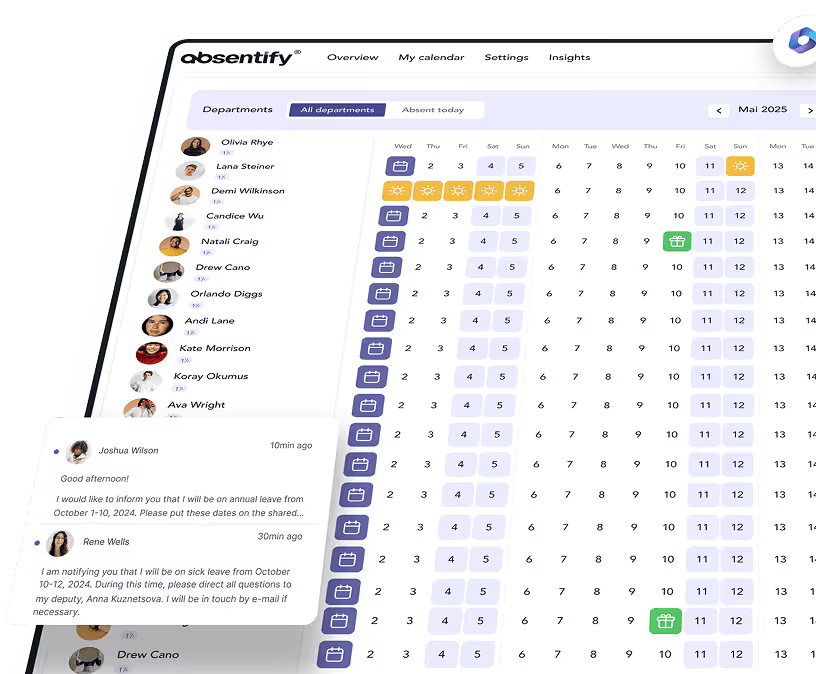
absentify brings the leave process directly into Microsoft 365. Employees can submit requests in Microsoft Teams or Outlook and have them handled through the configured approval process. Authorised people can see the current leave balance.
Manage leave requests where your team works
A clear leave request provides certainty about the proposed absence and gives the company the information needed for staffing. As teams grow, a shared process becomes more important so every request follows the same workflow.
With absentify, companies can run this process within their Microsoft 365 environment. The absentify feature overview shows how leave management fits into the existing working environment.
Your next step: Bring all leave requests into one consistent process and automate recurring steps.
Manage leave requests directly in Microsoft 365
Submit requests, configure approval workflows and keep planned team absences up to date in Microsoft Teams and Outlook.
Would you like to simplify your leave requests?
- No credit card required
- Unlimited free access
- Upgrade or cancel anytime
Leave requests – frequently asked questions
About the author

Anna Keller
Content manager at absentify
As a blog author at absentify, Anna Keller explains how companies can efficiently manage absences, vacations, and working hours. In her articles, she combines HR practice with Microsoft 365 tips for Outlook and Teams and provides templates, step-by-step instructions, and software comparisons for modern, digital processes.
Share article
More interesting articles

Workplace leave policies: what employers need to consider
A leave policy sets out how employees request time off and how the company approves it. Some provisions may form part of the employment contract; collective agreements, works agreements and internal procedures can add further requirements. This article explains the German framework, where the Federal Leave Act (Bundesurlaubsgesetz, or BUrlG) provides the legal baseline. Together, these rules create a consistent process for workplace leave planning.
Anna Keller
Content manager at absentify

Remaining leave: calculation, carryover and German legal rules
How many days of leave are still available, and how long can they be used? A remaining leave balance answers precisely these questions. It shows which days from the current or an earlier leave year are still outstanding. For companies, this figure also matters for future leave planning. In Germany, whether unused days can be carried over or expire later depends primarily on section 7 of the Federal Leave Act (BUrlG) and the employer's duties to cooperate.
Anna Keller
Content manager at absentify

Reducing overtime: rights, duties and the process for employers and teams
Reducing overtime means offsetting accumulated extra hours with time off or payment. Under German employment law, the six calendar months or 24 weeks specified in the German Working Time Act apply solely to offsetting an extended working day against the statutory eight-hour average. Employment contracts, works agreements or collective agreements determine how an overtime balance can be reduced. Where these rules permit time off in lieu, the employer determines its timing and process within the scope of their right to give instructions.
Anna Keller
Content manager at absentify