

Digital Leave Request: Apply for leave digitally and say goodbye to paper chaos

A digital vacation request puts an end to email chaos, forgotten Excel sheets, and lost vacation slips. Instead of a tedious back and forth, the entire process is clear and straightforward: apply for vacation online, approve, manage – all with just a few clicks. For employees, HR, or team leaders, this means less effort and more transparency.
In this article, you will learn how a digital vacation request works, what you should pay attention to, and how you can easily implement it in your company – without complicated systems or lengthy transitions.
What is a vacation request?
A vacation request is a formal notification to the employer, by which employees apply for leave for a specific period of time. In return, employees receive a vacation approval, which provides planning certainty.
Why is a vacation request important?
Without a leave request, things can quickly become chaotic:
-
Who is missing when?
-
Are there any overlaps?
-
How many vacation days are still available?
A **well-structured application **ensures that these questions do not arise at the last minute.
Moreover, the vacation request fulfills an important documentation obligation. Especially in case of a dispute – for instance, when it comes to the number of approved days or a rejected request – it is traceable who submitted and approved which application and when.
The classic vacation request: Challenges in the workday routine
Manual holiday requests seem simple at first glance – fill out a form, submit it, done. In practice, however, they often lead to friction losses. Papers get lost, emails go unanswered, and in the end, no one knows exactly who is on holiday when.
Especially in growing teams, this quickly leads to conflicts and planning chaos.
Absences overlap because there is no absence calendar. HR departments must manually transfer data into spreadsheets, and employees do not know whether their leave has been approved or not. A structured employee leave management helps to maintain an overview and avoid planning errors.
Why submitting a vacation request via email is not a solution
Writing a vacation request via email sounds practical, but is rarely well-considered. Without a clear structure, requests can get lost in long email threads or remain unanswered. Inquiries about dates, replacements, or remaining vacation days lead to endless back-and-forth messages.
Moreover, there is a lack of transparency: Who submitted the application and when? Was it approved? Who will represent the person during their absence? Without a central overview, teams and HR have to double-check many things and thus lose time that could be better spent elsewhere.

How does a digital vacation request work?
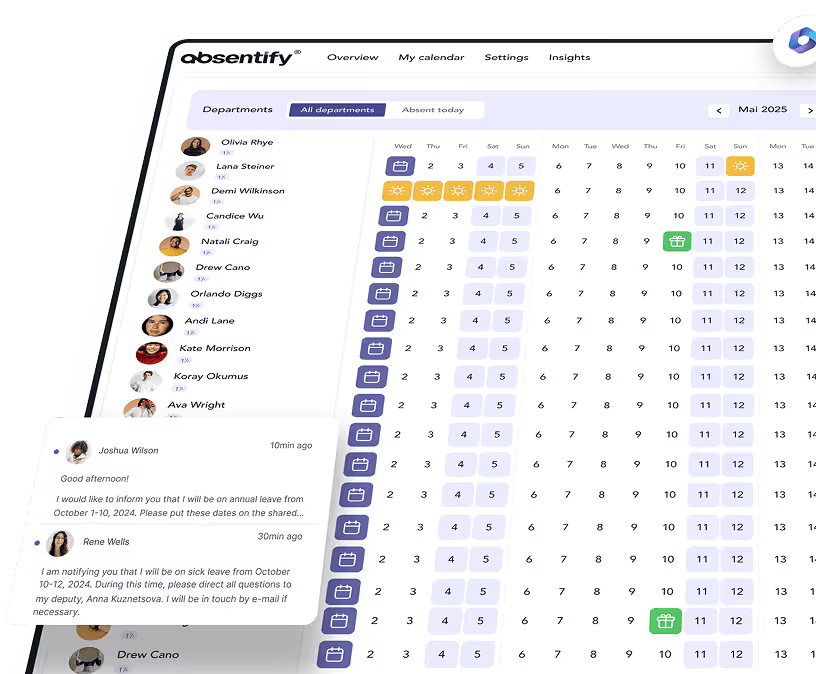
When companies manage vacation requests digitally, it replaces paper forms, email chains, and Excel spreadsheets with a clearly structured process in a central application. You select your desired period, see your remaining vacation days directly, and submit the request with a click.
Supervisors receive an automatic notification and can immediately review and approve the request – or return it with a comment. The status of the request is visible to you at any time. As soon as the leave is approved, the absence will be displayed in the team calendar.
Digital vacation planning made easy
Instead of manually entering appointments into tables, with a good digital vacation planner, you can see which employee is absent when – and whether your desired date is still available. The digital vacation calendar from absentify updates automatically, as soon as a request has been approved. This reduces inquiries and significantly simplifies coordination within the team.
Deputies can also be registered directly in the system with absentify. If the executive is on vacation, the application automatically goes to the responsible deputy – without delays or dead ends in the approval process.
Submit a vacation request online – it's that easy
With a digital vacation request, you no longer need to know where the right form is or who you should send the request to. Submitting for vacation becomes significantly easier:
-
Log in to absentify.
-
Select the period of absence.
-
If necessary, designate a proxy and click on 'Send'.
The responsible supervisor receives a notification and can immediately approve or comment. The feedback comes back to you – without lengthy email correspondence. The status of your request is visible at all times, even from your smartphone. This way you can request, approve, and manage leave – without having to go to the office.
What benefits does a digital vacation request bring to your company?
An online vacation request saves everyone involved a lot of time: You don't have to print anything, chase after anyone, or manually maintain any tables. At the same time, executives and HR teams gain more oversight and control over the entire holiday planning within the company.
More clarity, less coordination effort
With a central, digital vacation planner, you can immediately see who is absent from the team and when. This allows for:
✓ Avoid overlaps
✓ Organize representations better
✓ Identify bottlenecks early
A well-maintained vacation overview reduces inquiries and prevents important tasks from being neglected during an absence.
Auch für HR bringt die Umstellung spürbare Entlastung: Die Urlaubsverwaltung läuft nicht mehr über Mails, lose Notizen oder veraltete Listen. Stattdessen greifen alle auf denselben aktuellen Stand zu – übersichtlich, nachvollziehbar und ohne doppelte Datenpflege.
Smooth operations with absentify
With absentify, you get a tool where you can submit and approve leave requests with just a few clicks – directly in MS Teams and Outlook:
-
Thanks to the Cloud-based vacation management, there is no longer a dependency on internal servers or paper archives. The process remains fully usable even while on the go or in a home office.
-
By individually defined rules for automatic approvals, manual verification is eliminated for recurring absences.
-
Absences appear automatically in the calendar and the remaining vacation days are visible to employees at any time.


Start for free now
No credit card required—enjoy unlimited access with our free plan. You can upgrade or cancel anytime.
Here's how to submit a digital vacation request in your company
The transition to a digital system does not start with the IT department, but with clarity within the team:
-
Who should be allowed to submit vacation requests?
-
Who approves them?
-
How will employees be informed about the new solution?
A structured process helps to implement the change smoothly – without resistance or confusion.
5 steps to digital vacation management
1. Analyze the current state
What problems occur in the current process? Where is information lost? What systems are you already using, e.g., Microsoft Teams?
2. Select tool
Choose a solution that fits your workflows. absentify, for example, can be integrated directly into existing tools and doesn't require a long training period.
3. Define approval processes
Who approves vacations? Are there any substitution rules? Should certain requests be approved automatically?
4. Implement & communicate system
Make sure that all employees know how to request vacation and check the status. A brief training session or an explanatory video is often sufficient.
5: Gather feedback & adjust
After the first few weeks, get feedback from the team. Are there any questions, uncertainties, or ideas for improvement? Most tools – including absentify – can be quickly adjusted.
What legal aspects must you consider with digital vacation requests?
For digital vacation requests, the same legal requirements apply as for paper forms. It is important that the vacation request is verifiable, the approval is clear and the** data is stored securely**.
Vacation must be documented
A digital vacation request must follow a clearly verifiable process:
-
Who submitted which application and when?
-
Who approved or rejected this, and when?
Tools like absentify automatically log every action and thus fulfill the obligation to provide evidence.
Don't forget about data protection
Vacation data are considered personal information. This means: Only authorized individuals should have access to the vacation overview and history. A cloud-based vacation management system like absentify relies on role-based permission assignment – and meets the requirements of the GDPR.
Here's how to succeed with your digital vacation planning
A digital vacation request* *ensures clear procedures, saves time, and prevents errors. Whether you want to get your vacation request approved or plan it – with a digital solution, everything runs centrally, transparently, and without communication breakdowns. Especially as teams grow, a structured process becomes a real relief.
absentify makes exactly that possible:
✓ Streamlined vacation management, which integrates into existing systems like MS Teams and Outlook.
✓ Automatic calculation of remaining vacation days.
✓ Complete absence and vacation overview of all employees.
This will make your vacation planning not only more efficient, but above all more reliable.
Would you like to simplify your absence management?
- No credit card required
- Unlimited free access
- Upgrade or cancel anytime
Digital Leave Application – Frequently Asked Questions and Answers
About the author

Anna Keller
Content manager at absentify
As a blog author at absentify, Anna Keller explains how companies can efficiently manage absences, vacations, and working hours. In her articles, she combines HR practice with Microsoft 365 tips for Outlook and Teams and provides templates, step-by-step instructions, and software comparisons for modern, digital processes.
Share article
More interesting articles

Reducing overtime: rights, duties and the process for employers and teams
Reducing overtime means offsetting accumulated extra hours with time off or payment. Under German employment law, the six calendar months or 24 weeks specified in the German Working Time Act apply solely to offsetting an extended working day against the statutory eight-hour average. Employment contracts, works agreements or collective agreements determine how an overtime balance can be reduced. Where these rules permit time off in lieu, the employer determines its timing and process within the scope of their right to give instructions.
Anna Keller
Content manager at absentify
When does unused leave expire? Deadlines and exceptions that determine your entitlement
Under German law, unused leave expires only under certain conditions: entitlement generally lapses on 31 December, or after the carryover period on 31 March, only if your employer has given you timely and specific notice of the impending expiry and you still do not take the leave. An exception applies in cases of continuous illness.
Anna Keller
Content manager at absentify

Employee Self Service (ESS): Definition, Features, and Benefits for Leave and Absence Management
Employee Self Service (ESS) gives employees access to manage their personal data, leave requests, or absences themselves without coordinating every step with HR. The term originally comes from SAP HR modules and has become an umbrella term for self-service features in human resources. Its benefits are particularly clear in leave and absence management.
Anna Keller
Content manager at absentify