

HR Chatbot: Features, Compliance and Microsoft 365 Integration
An HR chatbot is a digital assistant that automatically answers employee queries about leave, sick notes, payroll or onboarding and connects to the underlying HR systems. Rolling one out requires technical integration, legal compliance with the GDPR and the EU AI Act, and — wherever co-determination applies — formal involvement of the works council or employee representatives.
HR Chatbot: The Essentials at a Glance
- An HR chatbot is a software application that automates HR queries such as leave, sick notes or payroll information through a chat interface. An HR AI chatbot uses Large Language Models for this; a rule-based chatbot relies on predefined decision trees.
- The EU AI Act classifies AI systems used to evaluate or select employees as high-risk applications under Annex III. The associated obligations on risk management, transparency and human oversight take effect from August 2026.
- GDPR compliance for HR chatbots requires a data processing agreement (DPA) with the vendor, EU hosting on Microsoft Azure and — in jurisdictions with statutory co-determination — a formal works agreement with the employee representatives.
- absentify automates absence management, leave requests and sick notes directly inside Microsoft Teams and Outlook, and takes the load off HR teams in exactly the request areas an HR chatbot would otherwise have to handle.
What Is an HR Chatbot?
An HR chatbot is a software application that automatically answers employee queries about HR processes. It draws on master data — such as leave allowances, sick days or payroll information — and can carry out simple actions, like creating a leave request, on its own.
Within the HR chatbot category there are two architectural variants. A rule-based HR chatbot follows predefined decision trees and only answers questions that are explicitly listed in its response catalogue.
An HR AI chatbot, i.e. a model with an attached AI layer, is built on Large Language Models. It also understands free-form questions, generates context-aware answers and can ask follow-up questions.
Both variants can take care of typical tasks such as leave requests, sick notes, payroll queries and onboarding FAQs. As soon as queries leave the predefined paths, however, the AI variant is far more flexible — but at the cost of stricter requirements around data protection and compliance.
Which Features Should an HR Chatbot Offer?
A capable HR chatbot offers self-service for the most common HR queries, a writable interface to the underlying HR systems and a documentable data-protection and audit concept.
Self-Service for Absence, Payroll and Onboarding
The most frequent requests directed at HR teams revolve around leave, sick notes, payroll and onboarding topics. A productive chatbot covers these cases end to end.
Employees submit a leave request directly in chat, see their remaining leave balance and immediately receive a confirmation or are routed to their line manager. Sick notes, digital leave requests and payroll queries follow the same logic.
Interfaces to HR Systems and Microsoft 365
The real value of an HR chatbot lies in its interfaces. Bidirectional APIs to HRIS, absence management software and payroll software ensure that data is correct on first capture and does not need to be cleaned up later.
In a Microsoft 365 environment, delivery happens via Microsoft Teams and Outlook, with Microsoft Entra ID as the identity source.
Data Protection and Audit Capabilities
An HR chatbot processes personal data, much of which is particularly sensitive. That requires a granular role and permission model, complete audit logs, data minimisation to what is strictly necessary and configurable retention periods. Without these audit capabilities, GDPR-compliant processing is in practice impossible to demonstrate.

Which Legal Requirements Apply to an HR Chatbot?
In the EU, an HR chatbot has to comply with three sets of rules in parallel. The GDPR governs the handling of personal data, the EU AI Act addresses AI-specific risks, and national co-determination law (such as the German BetrVG or the French Code du travail) safeguards the involvement of employee representatives.
How Does the EU AI Act Classify HR Chatbots?
Annex III of the EU AI Act names AI systems used in employment as high-risk applications whenever they influence decisions on recruitment, task allocation, performance evaluation or termination of employment.
For such systems, obligations include documented risk management, technical documentation, transparency towards affected employees and human oversight of every automated decision.
These obligations apply from 2 August 2026. A pure information chatbot without any decision-making function generally falls outside this category, but is still subject to disclosure obligations towards users.
What Does the GDPR Require for an HR Chatbot?
The GDPR requires a sound legal basis for every processing activity. In employment relationships, this is typically Article 6 GDPR combined with national employment-data rules (such as Section 26 of the German BDSG).
This entails purpose limitation, data minimisation and a retention period that does not extend beyond what the employment relationship requires. If you source the chatbot externally from a service provider, you need a data processing agreement (DPA) and should make sure the vendor uses EU hosting on Microsoft Azure. Equally important is GDPR-compliant leave management for the downstream absence data.
When Does a Works Council Need to Approve an HR Chatbot?
Wherever an HR chatbot could observe or evaluate employee behaviour or performance, statutory co-determination kicks in — for example, Section 87(1)(6) of the German Works Constitution Act (BetrVG) gives the works council an enforceable right of co-determination. Equivalent regimes exist in many other EU member states.
Before rollout, a works agreement should set out the purpose, scope of functions, categories of data, retention periods and analytics logic. Without such an agreement, the deployment is exposed to legal challenge.
How Do I Integrate an HR Chatbot into Microsoft 365?
To integrate an HR chatbot into Microsoft 365, start by working out the use cases you actually want to support. The combination of Microsoft Copilot Studio, Microsoft 365 Agents and Microsoft Entra ID allows the HR chatbot to read and write specific data fields and respond to user queries.
- Step 1: Define the use cases: the largest request volumes typically sit in leave requests, sick notes and payroll FAQs. These three clusters offer the most productive starting surface and deliver the biggest workload reduction.
- Step 2: Choose a platform: Microsoft Copilot Studio and Microsoft 365 Agents run inside Microsoft Teams. Third-party providers with a Teams app are an alternative, provided they offer EU hosting on Microsoft Azure and a robust DPA.
- Step 3: Map the data flows: Microsoft Entra ID supplies the identities, the HR systems supply the data. This is where you decide which fields the chatbot is allowed to read and write, and which absence management software feeds the data stream behind the chatbot.
- Step 4: Compliance: DPA, EU hosting on Microsoft Azure, data protection impact assessment and works agreement need to be in place before go-live.

Start for free now
No credit card required—enjoy unlimited access with our free plan. You can upgrade or cancel anytime.
Which Benefits Does an HR Chatbot Deliver for HR Teams?
An HR chatbot reduces the volume of requests reaching the HR team, shortens response times and makes HR processes scalable. The benefits are most visible for steady, recurring queries that today consume a disproportionate amount of HR time.
- Time gain for HR: standard queries about leave, sick notes and payroll move out of the inbox and into an automated workflow.
- Better response times: 24/7 availability with no waiting time, including outside office hours.
- Higher data quality: master data is updated directly in the source system, not pulled from emails after the fact.
- Scalability: the request volume no longer grows in proportion to the headcount.
How absentify Becomes the Data Backbone of Your HR Chatbot
An HR chatbot in Microsoft Teams needs a data source that knows the absence allowances, executes the approval workflows and keeps the use of personnel data legally compliant.
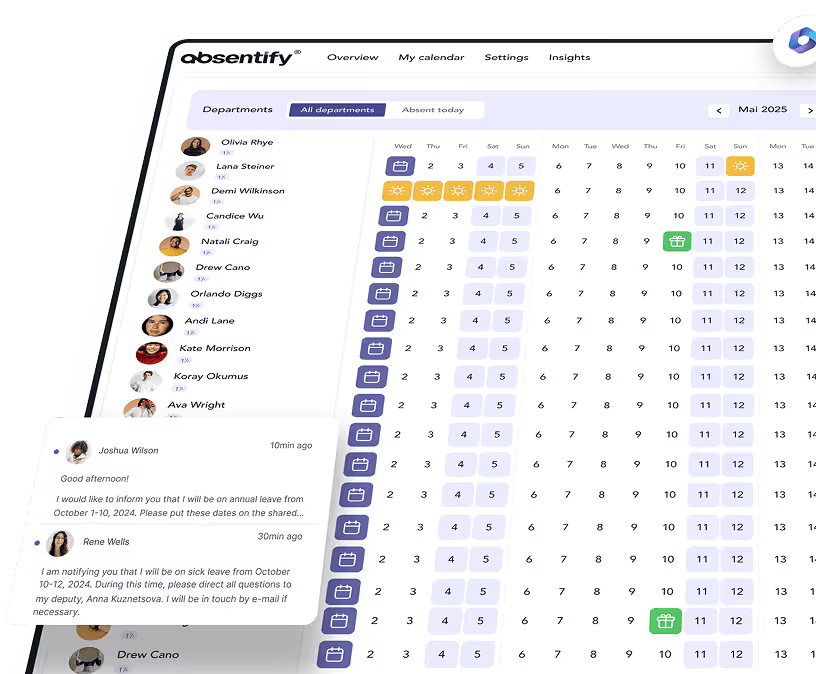
absentify takes on this role. As an absence management solution that is deeply embedded in Microsoft 365, absentify provides the real-time data that a chatbot can read directly via the Microsoft Graph API and webhooks.
When an employee submits a leave request through the chat, absentify calculates the entitlement, triggers the multi-stage approval workflow and writes the date into the Outlook calendar automatically.
- Compliant chatbot foundation: all absence data is hosted on ISO 27001-certified Azure servers in the EU. The chatbot answers HR queries on a basis that holds up against the GDPR and the EU AI Act.
- Real-time information: absentify exposes remaining leave, approval status and team availability via the Microsoft Graph API. The chatbot gives precise answers because it pulls fresh data on demand.
- Webhook notifications: as soon as absentify approves a leave request, a webhook automatically signals the chatbot. The employee receives the response directly in the Teams chat without having to ask.
- Copilot Studio and Power Automate ready: you connect absentify via Power Automate to Copilot Studio agents or Microsoft 365 Agents and build chatbot workflows without writing your own API code.
Want to simplify your HR administration?
- No credit card required
- Unlimited free access
- Upgrade or cancel anytime
HR Chatbot – Frequently Asked Questions
About the author

Anna Keller
Content manager at absentify
As a blog author at absentify, Anna Keller explains how companies can efficiently manage absences, vacations, and working hours. In her articles, she combines HR practice with Microsoft 365 tips for Outlook and Teams and provides templates, step-by-step instructions, and software comparisons for modern, digital processes.
Share article
More interesting articles
Reducing overtime: rights, duties and the process for employers and teams
Reducing overtime means offsetting accumulated extra hours with time off or payment. Under German employment law, the six calendar months or 24 weeks specified in the German Working Time Act apply solely to offsetting an extended working day against the statutory eight-hour average. Employment contracts, works agreements or collective agreements determine how an overtime balance can be reduced. Where these rules permit time off in lieu, the employer determines its timing and process within the scope of their right to give instructions.
Anna Keller
Content manager at absentify
When does unused leave expire? Deadlines and exceptions that determine your entitlement
Under German law, unused leave expires only under certain conditions: entitlement generally lapses on 31 December, or after the carryover period on 31 March, only if your employer has given you timely and specific notice of the impending expiry and you still do not take the leave. An exception applies in cases of continuous illness.
Anna Keller
Content manager at absentify
Employee Self Service (ESS): Definition, Features, and Benefits for Leave and Absence Management
Employee Self Service (ESS) gives employees access to manage their personal data, leave requests, or absences themselves without coordinating every step with HR. The term originally comes from SAP HR modules and has become an umbrella term for self-service features in human resources. Its benefits are particularly clear in leave and absence management.
Anna Keller
Content manager at absentify