

The 7 Best Vacation Planner Software Tools

Vacation planner software replaces error-prone Excel spreadsheets with clear, automated processes for leave requests, approvals, and calendar synchronization.
Best vacation planner software: The essentials at a glance
- Vacation planner software for businesses replaces messy spreadsheets with clear, automated workflows for requests, approvals, and calendar synchronization.
- Key factors when choosing vacation planner software include direct integration with existing systems, secure data handling in line with GDPR standards, and customizable approval workflows.
- This comparison of the best vacation planner software tools shows that features, pricing models, and integration options vary depending on company size, industry, and IT infrastructure.
Jump to the best vacation planner software tools
What are the key criteria for choosing the best vacation planner software?
You want to save time and avoid errors. A good vacation planning tool should also scale with your organization over the long term. These features make a difference:
Integration with calendars and systems
If you want absences to appear automatically in Outlook or Google Calendar, check whether the tool offers automatic user synchronization via Entra ID (or LDAP). This eliminates duplicate data entry and disconnected processes.
Workflows and approval levels
Think about your approval processes. Look for multi-level workflows with delegate and escalation rules. These help ensure that requests move quickly and compliantly through the right hands.
Data protection and data residency
Since you're storing sensitive personnel data, pay attention to GDPR compliance. Consider factors like server location and relevant certifications.
Cloud service vs. on-premise
Most modern vacation planners are cloud-based, allowing for quick deployment. However, if you have strict IT policies, some tools also offer on-premise installation or hybrid models.
Pricing models and additional fees
Pay attention to cost transparency. Many providers use tiered pricing based on user count and modules. With some systems, the base fee is supplemented by additional costs for modules like time tracking or performance management.

In a nutshell – what should you look for?
To simplify processes and increase transparency, certain features can be particularly helpful:
- Management of absence types
- Automatic synchronization
- Employee self-service
- Multi-level approval workflows
- Reporting capabilities
- User management via Entra ID
- GDPR compliance
#1 absentify
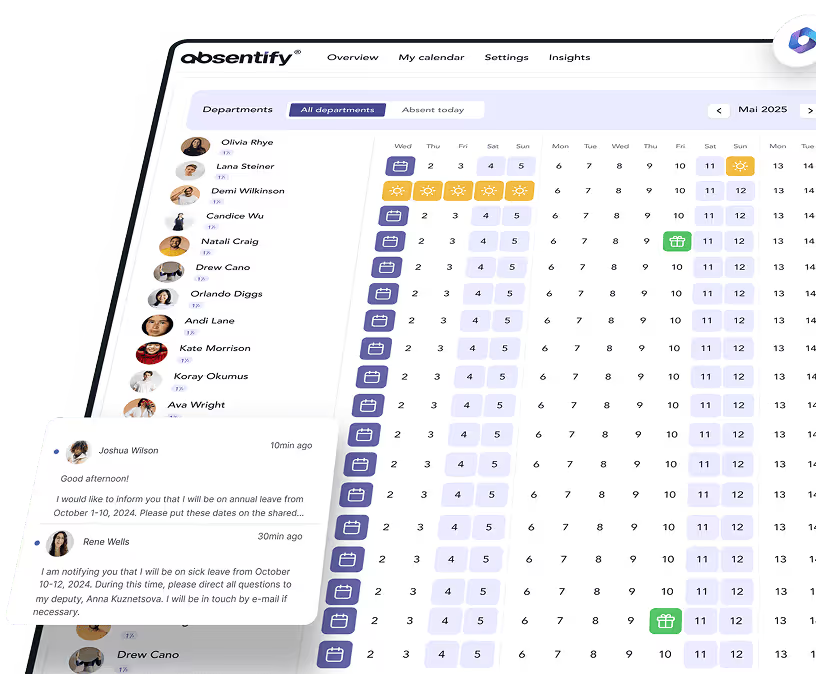
absentify is purpose-built for Microsoft 365 and enables fully integrated absence management. The platform automatically synchronizes with Entra ID, Teams, Outlook, and SharePoint — eliminating the need for manual user management.
absentify Strengths
- Deep Microsoft 365 integration: Vacations and absences are displayed directly in Outlook, Teams, and SharePoint.
- Automatic user synchronization: Syncing via Entra ID saves time and prevents duplicate records.
- Flexible workflows: Multi-level approval processes with delegate and escalation logic can be configured to your exact needs.
- Data protection: Fully GDPR-compliant storage within your own Microsoft 365 environment.
Features
- Management of vacation, sick leave, home office, and special absences
- Approval workflows in Teams
- Automatic out-of-office replies via Graph API
- Live dashboard in Teams & Power BI integration
- Conflict detection and bulk actions
absentify Plans & Pricing
absentify offers four pricing tiers based on team size. A free version is available.
| Plan | Price per user/month¹ | Departments | Key features |
|---|---|---|---|
| Free | Free | 2 | Basic absences, Outlook calendar, Teams app |
| Mini | $1/user | 4 | Additional absence types, 5 Power Automate connectors |
| Essentials (popular) | $2/user | 8 | Multi-level workflows, unlimited connectors, webhooks |
| Plus | $3.50/user | unlimited | API support, white-label, priority support |
¹Prices excl. taxes.
#2 Timebutler
Timebutler is a German tool that specializes in automated absence notifications and status updates within the Microsoft ecosystem.
Timebutler Strengths
- Automated out-of-office messages: Out-of-office emails can be sent on a schedule.
- Teams status synchronization: The presence status in Teams adjusts automatically.
- Quick setup: No complex installation or training required.
Features
- Automatic approval workflows
- Up-to-date leave balance management
- Configurable absence types
- Bulk creation & bulk import
Plans & Pricing
Timebutler offers a free basic plan and tiered pricing for larger teams. A 30-day trial is available.
| Plan | Price | User count |
|---|---|---|
| Plan 1 | €29.95/month | Up to 5 users |
| Plan 2 | €59.95/month | Up to 35 users |
| Plan 3 | €1.39/user/month | Per additional user from 35 users |
#3 timetape
timetape provides a visual absence overview directly within Microsoft Teams. Users see all team absences color-coded in a shared calendar.
timetape Strengths
- Color-coded calendars: Absences are instantly visible in the Teams calendar.
- Quick search: Employees and appointments can be found intuitively.
- Leave requests directly in chat: Requests are conveniently submitted through the Teams app.
Features
- Real-time calendar as a tab
- Excel reports & charts
- Export interface & DATEV exports
Plans & Pricing
timetape offers two plans and a 30-day trial period. Annual billing gives you a 10% discount.
| Plan | Price per user/month | Key features |
|---|---|---|
| Standard | from $2 | Leave management, Outlook & calendar integration |
| Premium | from $4 | Time tracking, digital clock-in, advanced options |
#4 HRWORKS
HRWORKS is a German cloud solution focused on standardized HR processes and legally compliant personnel administration.
HRWORKS Strengths
- Time tracking with rules: Automatic breaks, surcharges, and mobile time tracking included.
- Travel expense management: Digital receipt capture and legally compliant reimbursement.
- German hosting: ISO-certified servers and GDPR-compliant data storage.
Features
- Management of various absence types
- Approval workflows for leave requests
- Reporting functions with overviews of absences, sick days, etc.
- Compliance documents for leave expiry and automated deadline reminders
- Integration with the time tracking module
Plans & Pricing
Pricing depends on user count and module scope. A free trial period is available.
| Cost type | Amount | Details / Requirements |
|---|---|---|
| License fee | €12.90/user per month | Minimum: 20 users |
| Monthly base fee | €60 (20–49 users) €90 (50–99) €150 (100–299) €300 (300+ users) | in addition to license fee |
| One-time costs (implementation, training, etc.) | €1,550 (20–49 employees) €2,430 (50–99) €4,480 (100–299) | includes consulting and training hours |
| Enterprise pricing | on request | from 300 employees |

Start for free now
No credit card required—enjoy unlimited access with our free plan. You can upgrade or cancel anytime.
#5 TimeTac
TimeTac is an Austrian solution that combines time tracking, leave management, and project management in one platform.
TimeTac Strengths
- Dynamic time tracking: Via web, terminal, or app.
- LDAP integration: Automatic user data synchronization.
- Real-time reporting: Up-to-date analytics for projects and absences.
Features
- Leave planning & approval process
- Project & working time tracking
- Automatic leave balance calculation
- Mobile access
Plans & Pricing
TimeTac uses modular pricing plus a base fee. An additional monthly base fee of €21.00 (or €17.50 with annual billing) applies for technical operations, updates, and support.
| Module | Price/user/month | Key features |
|---|---|---|
| Leave management | €3.20 | Leave planning & approval processes |
| Time tracking | €5.20 | Time recording, analytics, clock-in |
| Project time tracking | €10.10 | Project hours, activities, cost centers |
#6 Kenjo
Kenjo combines HR administration, time management, and performance reviews in a single cloud tool. The software targets businesses that want to manage HR processes in one place.
Kenjo Strengths
- Comprehensive core features: Time tracking, absences, performance, and documents.
- Simple pricing structure: Clear, straightforward plans.
- Shift planning included: Schedule shifts directly within the system.
Features
- Digital leave requests and approvals
- Automatic remaining leave calculation
- Customizable absence types and policies
- Reporting and export functions
Plans & Pricing
Kenjo offers tiered features and add-ons.
| Plan | Price/user/month | Key features |
|---|---|---|
| Starter | €5.40 | HR admin, time management, basic performance |
| Growth | €9 | Additional signatures, kiosk app, advanced workflows |
| Connect | on request | API integration and complex system connections |
#7 absence.io
absence.io is a tool for digital vacation planning and absence management. The software automates processes that would otherwise be handled manually and ensures structured, transparent workflows.
absence.io Strengths
- Absence-focused: Dedicated to leave planning and absence management.
- Clear pricing: Transparent cost structure with GDPR-compliant data storage.
- Calendar synchronization: Integration with existing calendars and customizable approval processes.
Features
- Digital leave requests with approval workflows
- Substitute management during absences
- Automatic leave balance administration
- Team calendar with Outlook and Google sync
Plans & Pricing
absence.io offers modular packages based on the number of selected features. All features can be tested for 14 days.
| Modules | Price/user/month | Included features |
|---|---|---|
| 1 module | €2 | Leave management, time tracking, or personnel file |
| 2 modules | €4 | Combination of two modules |
| 3 modules | €5 | All three modules |
The "Expense and travel cost management" add-on can be booked for an additional €4.50 per user/month.
#8 Factorial
Factorial is a Spanish HR system that works cloud-based and unites multiple HR areas in one tool.
Factorial Strengths
- All-in-one approach: HR administration, recruiting, time management, and performance management.
- User-friendly: Intuitive interface and modern design.
- Accessible anywhere: Available via web browser and app.
Features
- Digital leave requests and approvals
- Team calendar with absence overview
- Customizable leave policies and allowances
- Reports and analytics on absences
Plans & Pricing
Pricing at Factorial varies by module and user count. A free trial period is available.
- Core HR plan starts from €8 per user/month.
- Add-ons can be added on request.
How to find the best vacation planner software for your needs
When choosing vacation planner software, don't just look at the interface and price. The system you choose should scale with your team, integrate easily with existing tools, and meet the highest data protection standards. Optimized approval workflows and automatic synchronization also ensure smooth processes over the long term.
Growth and reliability
Your vacation planning software should remain reliable and performant as your team grows. A solid technical foundation is especially important when many users access the system simultaneously.
Integration and extensibility
Check how well the software connects with existing systems like Microsoft 365, ERP, or payroll solutions through APIs or interfaces. Open integrations increase flexibility and prevent duplicate data entry.
Data protection and security
Since personal data is being processed, strict data protection is essential. Look for GDPR compliance, encrypted data transmission (e.g., SSL/TLS), and a clear role-based access model.
Additional tips:
- Estimate how much your organization will grow in the coming years.
- Plan a realistic budget for ongoing operations.
- Test multiple providers in practice for usability, feature scope, and everyday suitability.
Is absentify the right vacation planning software for you?
Looking for vacation planner software that integrates directly into your existing IT infrastructure and noticeably simplifies processes? Then try absentify now in a live personal demo and discover how you can manage vacation planning and substitutions right within your digital workspace.
Want to simplify your vacation planning?
- No credit card required
- Unlimited free access
- Upgrade or cancel anytime
Best vacation planner software – Frequently asked questions and answers
About the author

Anna Keller
Content manager at absentify
As a blog author at absentify, Anna Keller explains how companies can efficiently manage absences, vacations, and working hours. In her articles, she combines HR practice with Microsoft 365 tips for Outlook and Teams and provides templates, step-by-step instructions, and software comparisons for modern, digital processes.
Share article
More interesting articles
Reducing overtime: rights, duties and the process for employers and teams
Reducing overtime means offsetting accumulated extra hours with time off or payment. Under German employment law, the six calendar months or 24 weeks specified in the German Working Time Act apply solely to offsetting an extended working day against the statutory eight-hour average. Employment contracts, works agreements or collective agreements determine how an overtime balance can be reduced. Where these rules permit time off in lieu, the employer determines its timing and process within the scope of their right to give instructions.
Anna Keller
Content manager at absentify
When does unused leave expire? Deadlines and exceptions that determine your entitlement
Under German law, unused leave expires only under certain conditions: entitlement generally lapses on 31 December, or after the carryover period on 31 March, only if your employer has given you timely and specific notice of the impending expiry and you still do not take the leave. An exception applies in cases of continuous illness.
Anna Keller
Content manager at absentify
Employee Self Service (ESS): Definition, Features, and Benefits for Leave and Absence Management
Employee Self Service (ESS) gives employees access to manage their personal data, leave requests, or absences themselves without coordinating every step with HR. The term originally comes from SAP HR modules and has become an umbrella term for self-service features in human resources. Its benefits are particularly clear in leave and absence management.
Anna Keller
Content manager at absentify