

Absence management: definition, absence types and software

Absence management means planning, recording and administering all time away from work in a company — from vacation and sickness to parental leave. HR teams without clear processes waste time on manual coordination and risk errors in approvals and cover arrangements. What is needed is a workflow that reflects legal requirements and makes absences transparent.
Absence management: the essentials at a glance
- Absence management covers all processes for planning, approving and documenting vacation, sickness, parental leave and other time away from work.
- Germany’s Federal Vacation Act (BUrlG) guarantees employees at least 20 vacation days per year on a five-day week. The Continued Remuneration Act (EFZG) governs sick pay for up to six weeks.
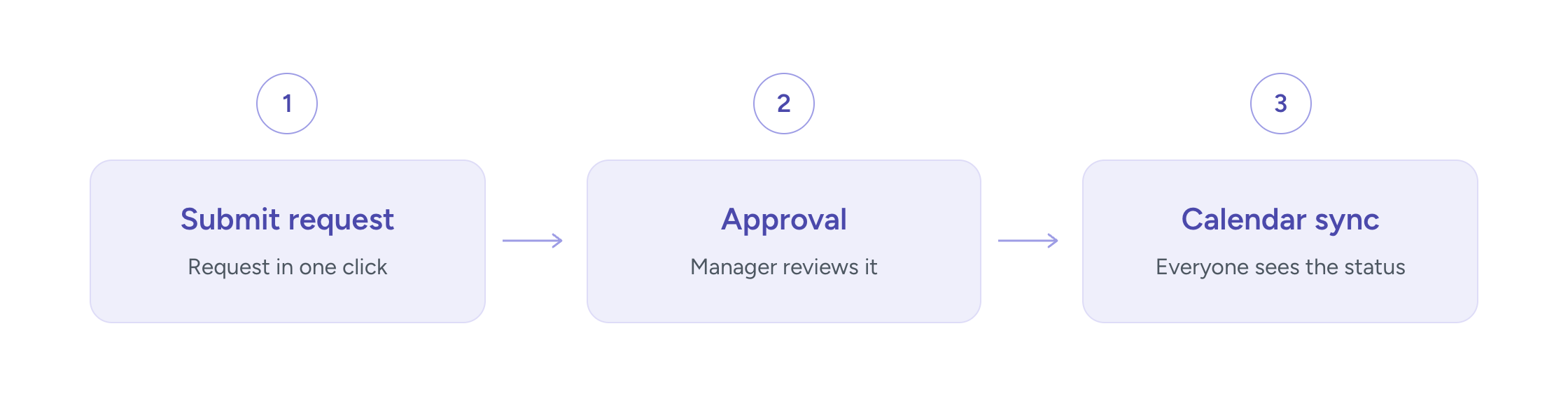
- Structured vacation and absence management breaks down into three steps: the employee submits a request, the manager approves it, and the team calendar is synchronised.
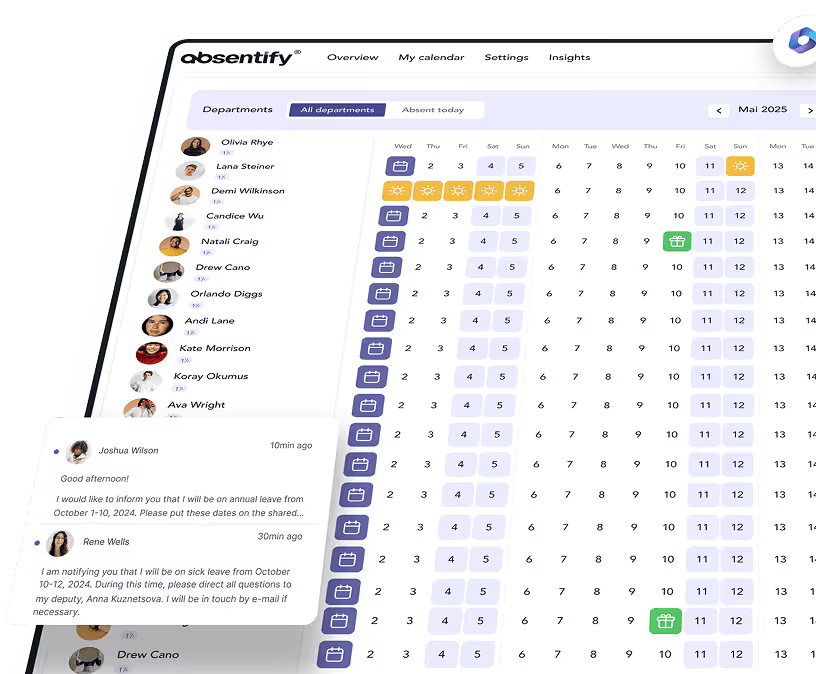
- absentify integrates directly into Microsoft Teams and Outlook, so absence requests can be submitted and approved without switching to a separate platform and are published automatically as an out-of-office note in Outlook.
What is absence management?
Absence management means planning, administering and documenting all time away from work in a company. That includes vacation, sick days, parental leave and other reasons that keep employees from working. The goal is to record absences in time, arrange cover and meet legal documentation duties.

What types of absence exist in a company?
In day-to-day operations, different types of absence occur — both planned and unplanned. Here are a few examples:
- Planned vacation: Employees take annual leave that is requested and approved in advance.
- Sickness: Unplanned absence due to health issues.
- Parental leave: Time off to care for and raise a child.
- Special leave: Time off for special occasions such as marriage, the birth of a child or bereavement.
- Unpaid leave: Time off without continued pay, for example for personal projects or travel.
- Educational leave: Time off to attend training or further education.
- Business travel: Absence due to work-related travel on behalf of the employer.
- Company shutdown: Vacation periods set by the employer during which the business is closed.
- Home office: Working from home; not absence in the classic sense, but still needs clear rules.
Which legal rules apply to absence management in Germany?
In Germany, several laws govern employee absences. The Federal Vacation Act (BUrlG) secures the entitlement to paid annual leave. Under Section 3 BUrlG, the statutory minimum is 24 working days per year on a six-day week. On a five-day week, that equals 20 working days.
Other relevant laws alongside the BUrlG include:
- Continued Remuneration Act (EFZG): It governs continued payment of wages in case of sickness for up to six weeks.
- Maternity Protection Act (MuSchG): This law protects expectant mothers before and after birth, including employment bans and financial protection.
- Federal Parental Allowance and Parental Leave Act (BEEG): It defines entitlements to parental leave and parental allowance for caring for and raising children.
What challenges arise without structured absence management?
Unstructured absence management costs companies measurable time. When sick notes arrive by email and vacation requests live in Excel spreadsheets, typical problems follow: duplicate approvals, missing cover arrangements and incomplete documentation.
| Criterion | Excel list | absentify / software |
|---|---|---|
| Time effort | High – manual entries, email chains and error fixes cost hours every day | Low – requests, approvals and calendar sync run fully automatically |
| Error rate | High – duplicates, missed requests and wrong leave balances appear regularly | Low – leave balances are calculated automatically; no request gets lost |
| Audit readiness | None – missing timestamps; not reviewable for audits or authority requests | Complete – all absences with timestamps, GDPR-ready and available on demand |
| Transparency | Low – only HR knows the status; the team has no real-time overview | Complete – every team member immediately sees who is available when |
HR teams that must react to sick notes at short notice need a real-time view of who is available and who can cover. Without a shared system, that overview is missing and capacity gaps only become visible when it is almost too late to respond.
Missing transparency also increases the risk of failing to meet legal duties cleanly — for example around sick notes, electronic sick-note retrieval or employees’ cooperation duties when ill.

Absence documentation that stands up to review
absentify records absences with timestamps and makes sick notes, vacation requests and approvals available in one click. It is designed for GDPR-compliant processes and integrates directly into Microsoft 365.
How does absence management work in Outlook and Microsoft Teams?
Absence management in Outlook and Microsoft Teams runs through three functions:
- Calendar sharing
- Out-of-office notes
- Status updates
When you plan absences directly in the Microsoft 365 environment, you avoid switching to external apps and keep all information where the team already works.
The out-of-office note in Outlook is usually called Automatic replies and can be set up via File → Automatic replies. A ready-made out-of-office template helps you draft the automatic reply quickly.
absentify goes one step further. The software synchronises absence requests automatically with the Outlook calendar and sets the out-of-office note without manual effort. Teams status is updated accordingly. How to set a Teams absence is covered in detail in the linked article.
Which best practices improve absence management?
If you keep a few things in mind, absences in your company become easier to manage. That reduces the load on your team and creates transparency and fairness.
Tips for better absence management
Strong absence management starts with clear processes and rules. Vacation requests, sick notes and other absences should follow a standard path to avoid misunderstandings and delays. Employees also need to know at all times whom to contact and which deadlines or formalities apply.
Forward planning is another key point. Regular team check-ins help avoid overlaps — for example when several people want leave at the same time. Especially in busy periods or during school holidays, early coordination helps secure capacity.
You should also watch transparency in the team. Everyone should have access to a clear calendar that shows planned absences. That creates a shared understanding of availability and makes cover easier to organise.
Why does software help with absence management?
Manual methods such as Excel spreadsheets or email coordination are often error-prone and time-consuming. This is where software comes in: specialised tools simplify planning and automate many processes that used to be done by hand. With the right absence management software, absences can be recorded directly, approval workflows improved and conflicts avoided.
Another advantage of absence management software is its feature set: it covers different absence types such as vacation, sickness, special leave or parental leave and presents them clearly. Many systems also offer automatic reminders or calendar integration that make everyday work much easier.
7 benefits of absence management software:
- Time savings in planning
- Transparency for the whole team
- Automated approval workflows
- Absence types tailored to the team
- Fewer errors through automation
- Integration into existing tools
- Long-term overview and reporting
Want to simplify your absence management?
- No credit card required
- Unlimited free access
- Upgrade or cancel anytime
How to get structured absence management up and running
Structured absence management needs clear processes, consistent templates and a system that covers approvals and documentation automatically. Teams that still coordinate absences by email spend more time on follow-up than on actual HR work. With the right setup, vacation requests, sick notes and cover arrangements can be organised so HR and managers always keep the overview.
Your benefits with absentify:
- Absence requests are submitted and approved directly in Microsoft Teams, without opening an extra app.
- Outlook calendar and out-of-office notes update automatically.
- Leave balances are calculated in real time so employees can always see remaining vacation.
- absentify is GDPR- and ISO-27001-compliant and runs within the Microsoft 365 security framework.
Start free with absentify now
230,000+ users already manage vacation days and sick notes directly in Teams and Outlook. absentify is set up in a few minutes — without rebuilding your processes.
Absence management – frequently asked questions
About the author

Anna Keller
Content manager at absentify
As a blog author at absentify, Anna Keller explains how companies can efficiently manage absences, vacations, and working hours. In her articles, she combines HR practice with Microsoft 365 tips for Outlook and Teams and provides templates, step-by-step instructions, and software comparisons for modern, digital processes.
Share article
More interesting articles
Workplace leave policies: what employers need to consider
A leave policy sets out how employees request time off and how the company approves it. Some provisions may form part of the employment contract; collective agreements, works agreements and internal procedures can add further requirements. This article explains the German framework, where the Federal Leave Act (Bundesurlaubsgesetz, or BUrlG) provides the legal baseline. Together, these rules create a consistent process for workplace leave planning.
Anna Keller
Content manager at absentify
How to request annual leave: process, approval and rules
A leave request records the dates an employee would like to take off. It provides the basis for approval and team absence planning. Employers can check the dates against existing absences and operational requirements. Approval gives employees clarity about their holiday. This guide covers annual leave in Great Britain: the Working Time Regulations 1998, relevant agreements and the company's procedures determine the rules.
Anna Keller
Content manager at absentify
Remaining leave: calculation, carryover and German legal rules
How many days of leave are still available, and how long can they be used? A remaining leave balance answers precisely these questions. It shows which days from the current or an earlier leave year are still outstanding. For companies, this figure also matters for future leave planning. In Germany, whether unused days can be carried over or expire later depends primarily on section 7 of the Federal Leave Act (BUrlG) and the employer's duties to cooperate.
Anna Keller
Content manager at absentify